Dry apnea training for tablet and browser
CO₂ and O₂ tables, Apnea Walk, pranayama and a full technical coach with live telemetry. Guided by voice while you train and works offline.
Free · No signup · Tablet, Android, iOS and desktop
Everything you can train
Four tools that cover dry training from start to finish.
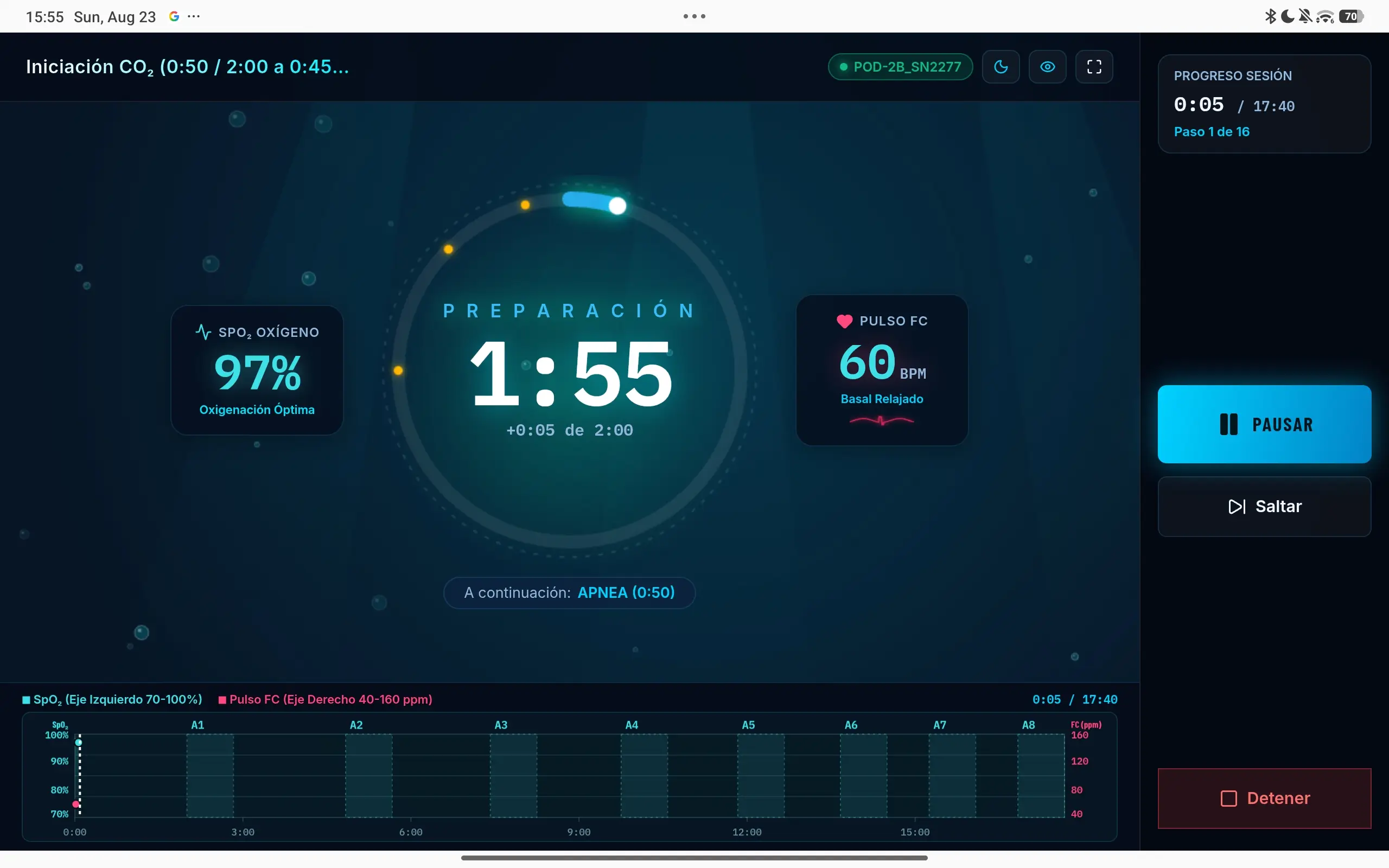
Every phase, called out and timed
While you train, the screen shows only what matters: the current phase, the time left and what comes next. On either side, live saturation and pulse; below, the curve of the whole session as it unfolds.
- Current and next phase always in view.
- Live SpO₂ and heart rate, right next to the timer.
- Session progress, with pause, skip and stop within reach.
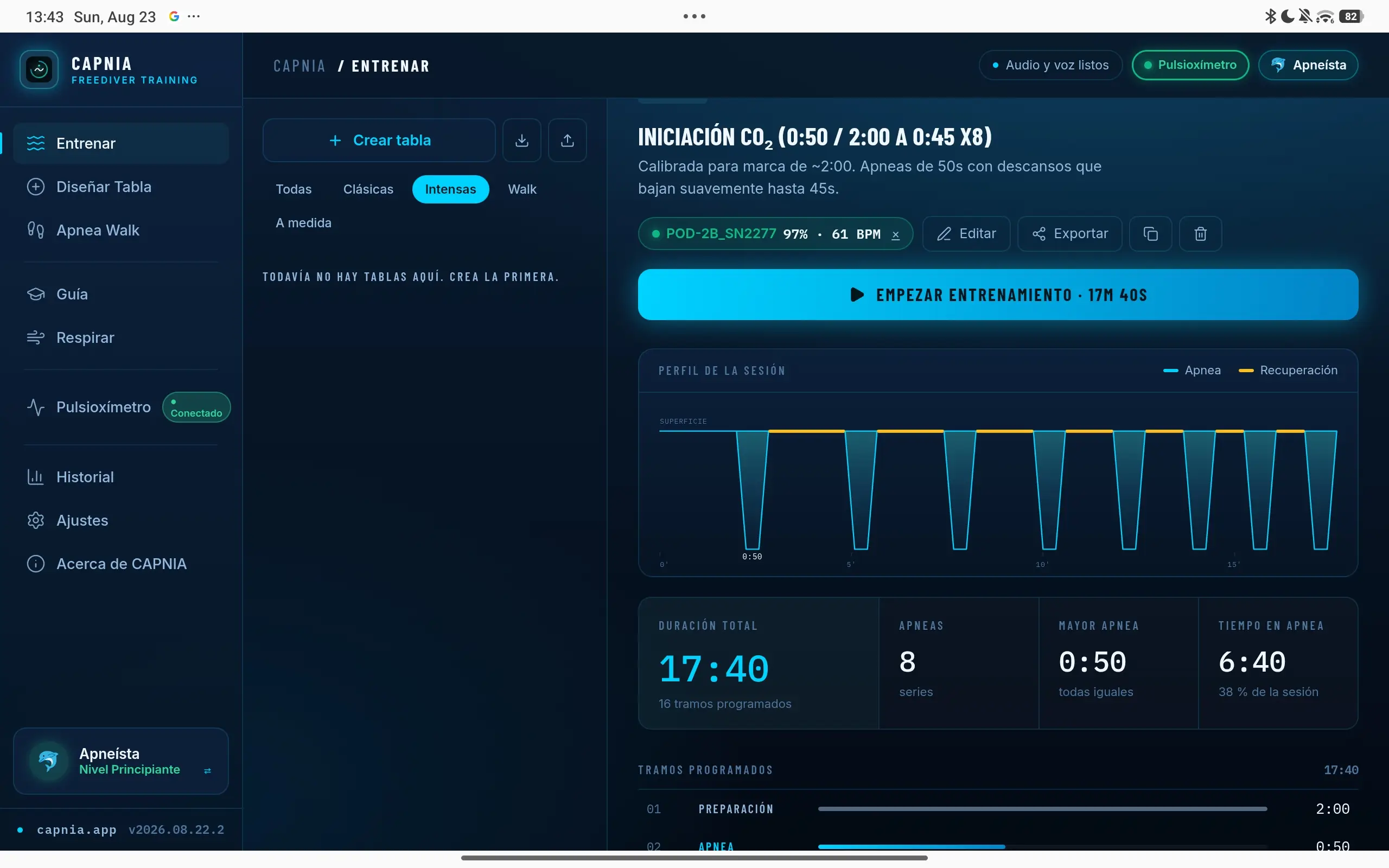
Train with your tables
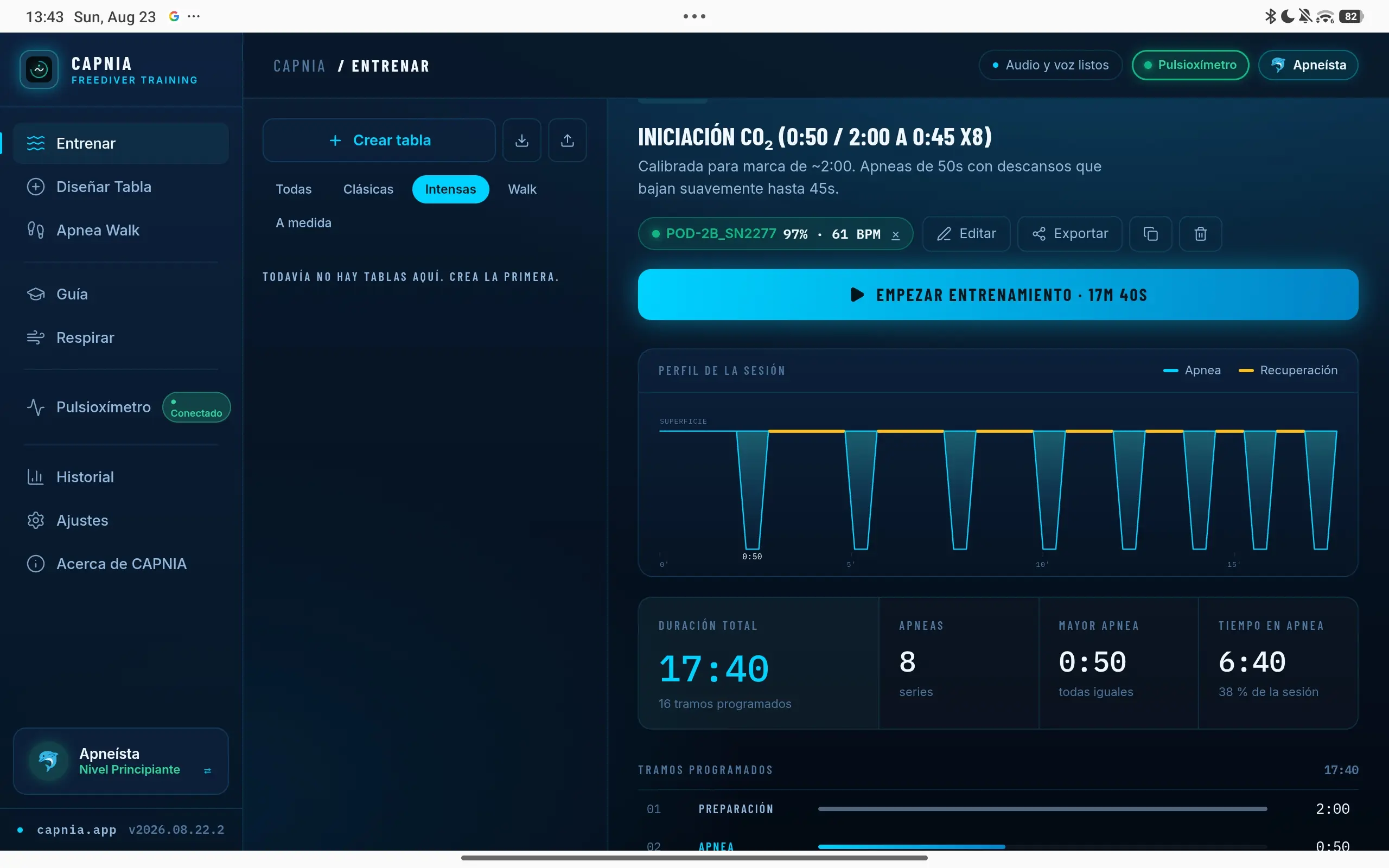
Pick a table and the app handles the rest: session profile, programmed segments and a timer for every hold. At a glance you see the total duration, how many sets are left and how much of the time you will spend holding your breath.
- Visual session profile before you start.
- Filter by type: classic, intense, walk or custom.
- Live saturation and pulse if you pair the oximeter.
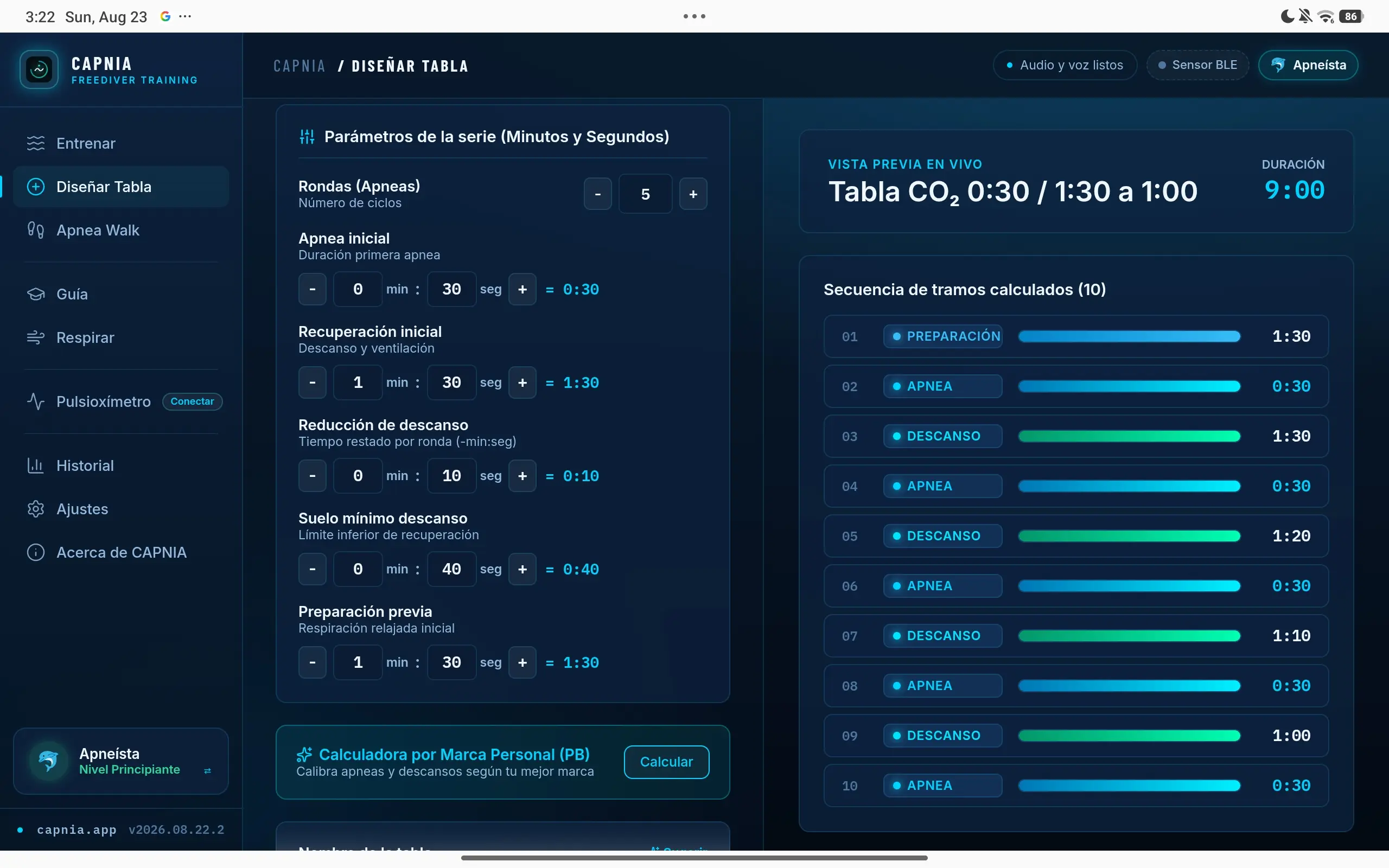
Design your own tables
Set the rounds, the opening hold, the recovery, how much rest is shaved off each round and the minimum floor. The preview recalculates the whole sequence live as you move the parameters.
- Live preview with every calculated segment.
- Personal-best calculator to pitch the table at your level.
- Save, duplicate and export your sets.
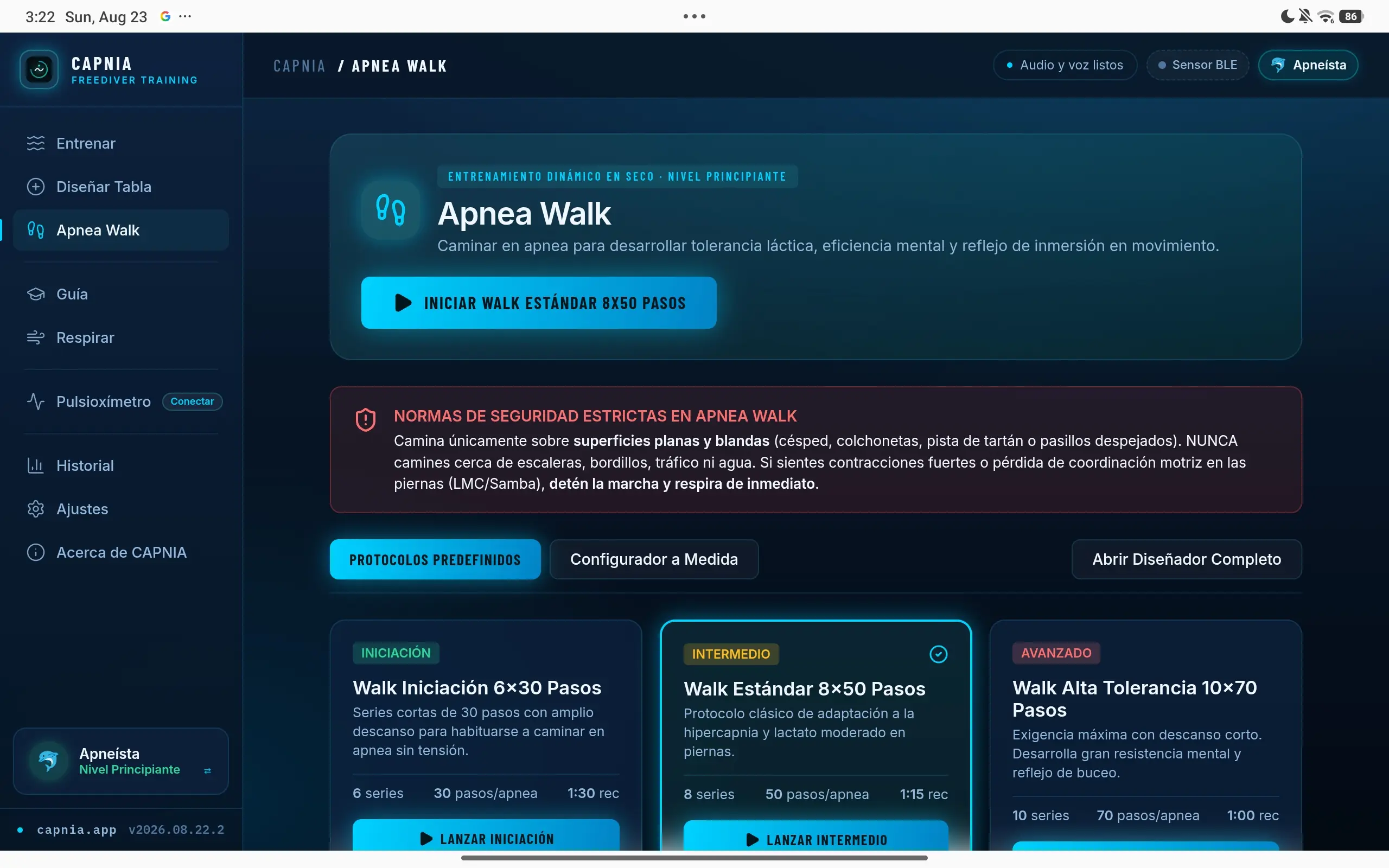
Apnea Walk
Walking on a held breath to build lactic tolerance, mental efficiency and the dive reflex in motion. With protocols by level and the safety rules specific to walking always in view.
- Beginner, standard and high-tolerance protocols.
- Custom builder for sets, steps and recovery.
- Safety warnings specific to training on the move.
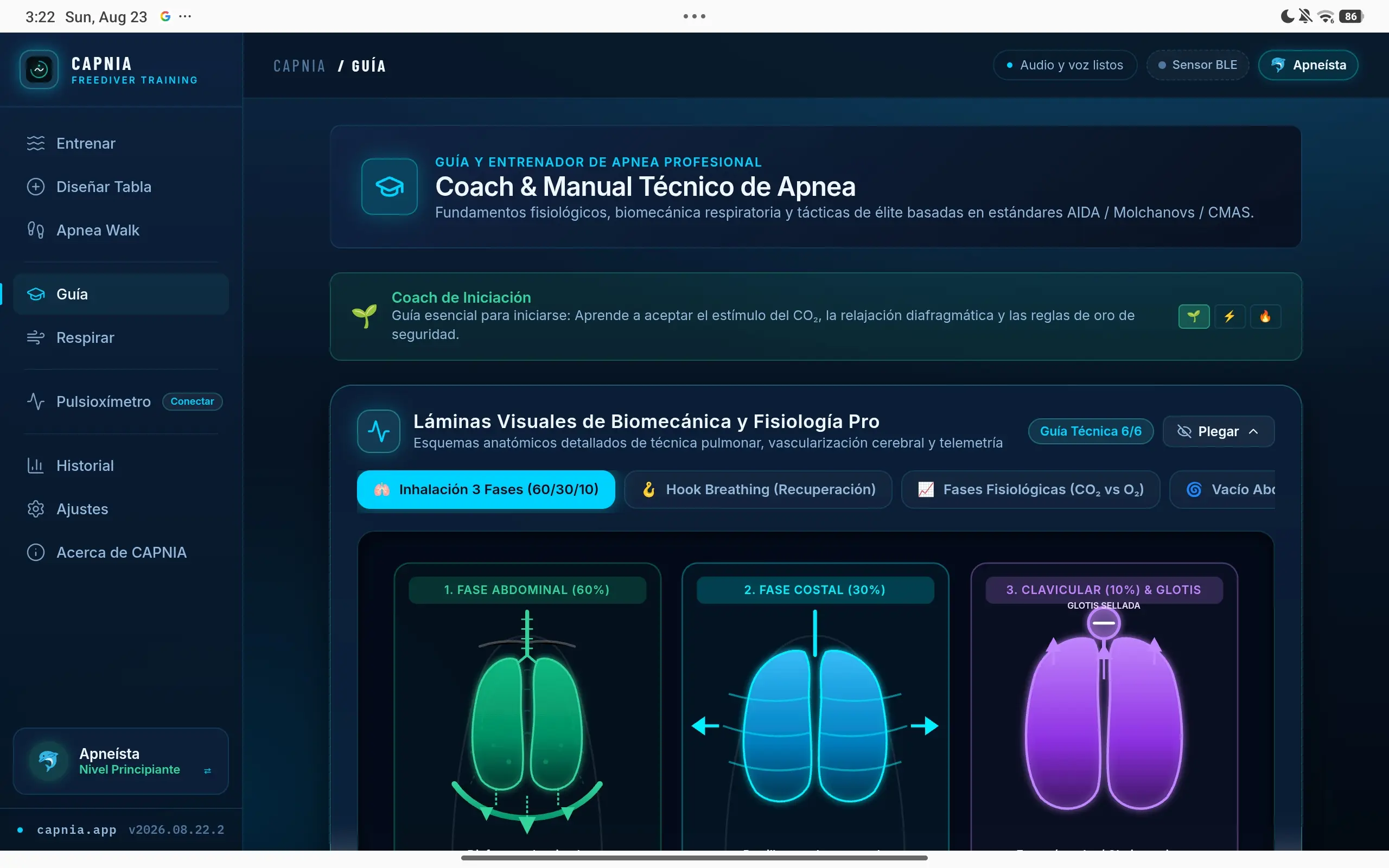
Coach and technical manual
Physiological fundamentals, breathing biomechanics and tactics based on AIDA, Molchanovs and CMAS standards. With visual plates on lung technique, cerebral vascularisation and telemetry.
- Beginner coach with the golden rules of safety.
- Plates on three-phase inhalation, hook breathing and abdominal vacuum.
- The CO₂ versus O₂ curves, explained.
Live telemetry
Pair your pulse oximeter and watch what your body does
CAPNIA talks to Bluetooth Low Energy pulse oximeters and heart rate straps. Pair the sensor once and from then on saturation and pulse appear on the training screen, are drawn onto the session curve and get saved along with it.
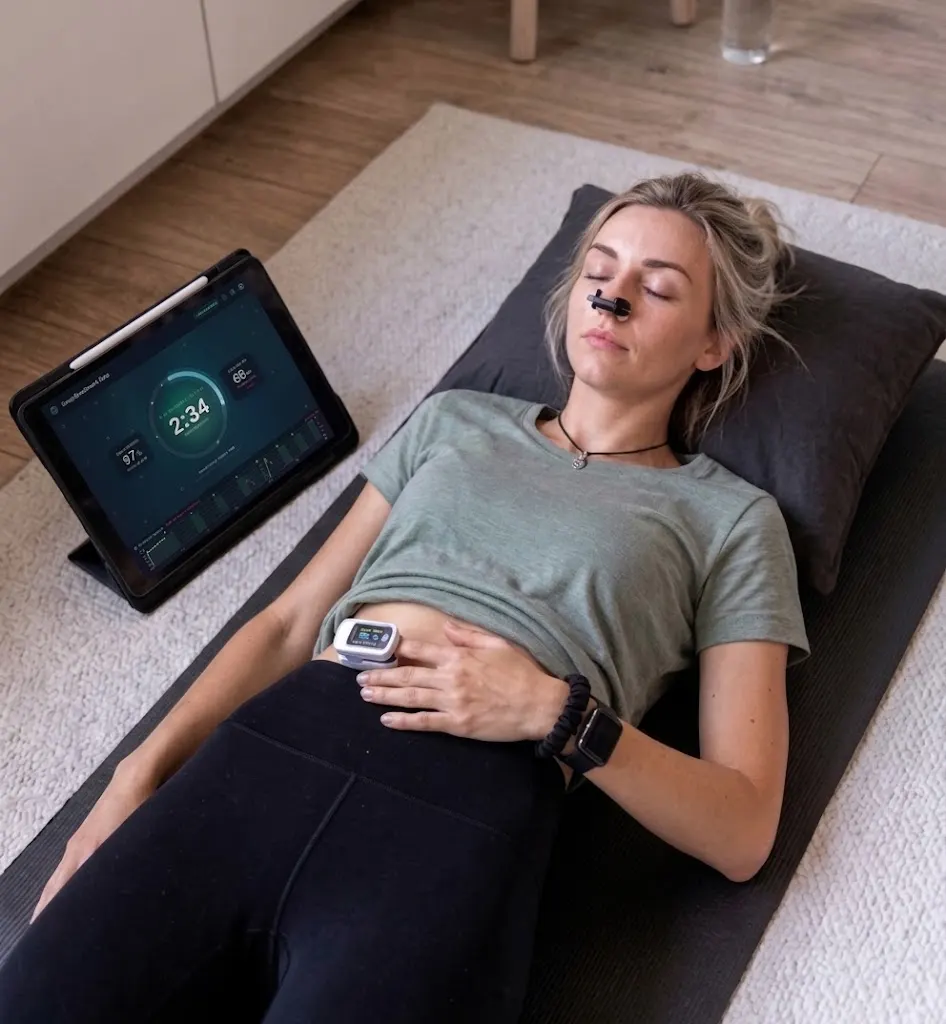
Made to be used with your eyes closed
Literally: during a hold you should not be staring at a screen.
- Voice guidance
- The app calls out the phases as they come. No need to watch the screen mid-hold, or touch it with wet hands.
- Readable from a distance
- Timers and phases read clearly from the mat, with the tablet propped up a couple of metres away.
- Audio cues
- Precise audio signals for the start, the end and every phase change.
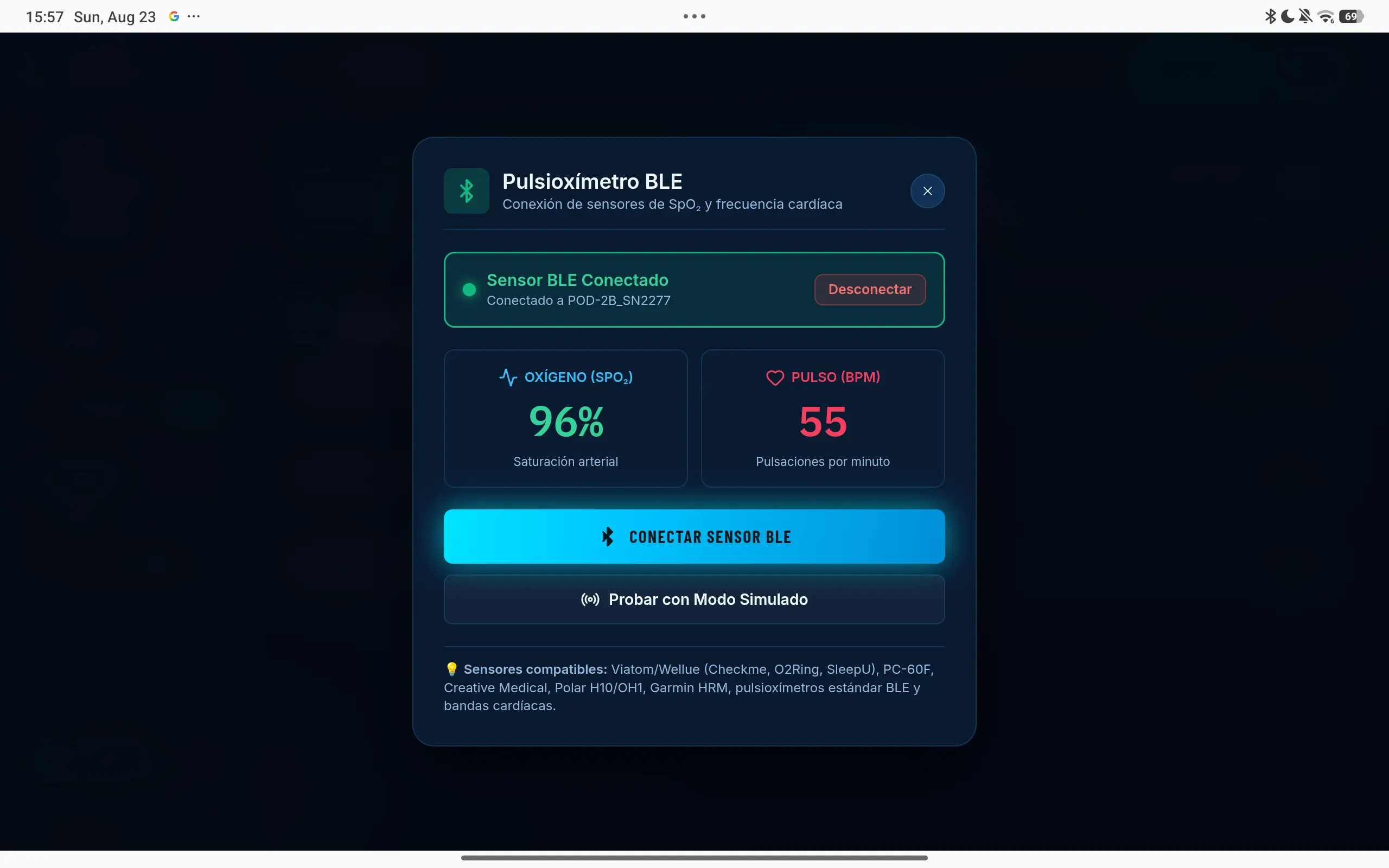
Compatible sensors
- Viatom / Wellue (Checkme, O2Ring, SleepU)
- PC-60F
- Creative Medical
- Polar H10 and OH1
- Garmin HRM
- Standard BLE pulse oximeters and heart rate straps
No sensor yet? There is a simulated mode to try the telemetry without hardware.
✓View detailed compatibility table (Android, iPad, Mac, Windows...)
Talking to the sensor uses Web Bluetooth, and not every browser implements it. The app runs on all of them; what changes is whether it can read the oximeter.
| Device | Browser | App | BLE sensor |
|---|---|---|---|
| Android (tablet or phone) | Chrome, Edge, Opera | Yes | ✓ Yes |
| Windows, macOS, Linux | Chrome, Edge | Yes | ✓ Yes |
| iPad and iPhone | Safari and any other | Yes | ✕ No |
| Any | Firefox | Yes | ✕ No |
On iPhone and iPad no browser can connect Bluetooth sensors: Apple does not implement Web Bluetooth in WebKit, and every iOS browser is required to use it. The app installs and trains normally, but live telemetry is out. To train with a sensor, use an Android tablet.
Personalisation
15 themes to choose from
The same screen, in whichever skin you prefer. Fifteen combinations across three families: dark ones for training at night or in low light, light ones for outdoors in full sun, and mid-tone ones for everything in between. You switch in Settings and it applies instantly.
15 themes to choose from
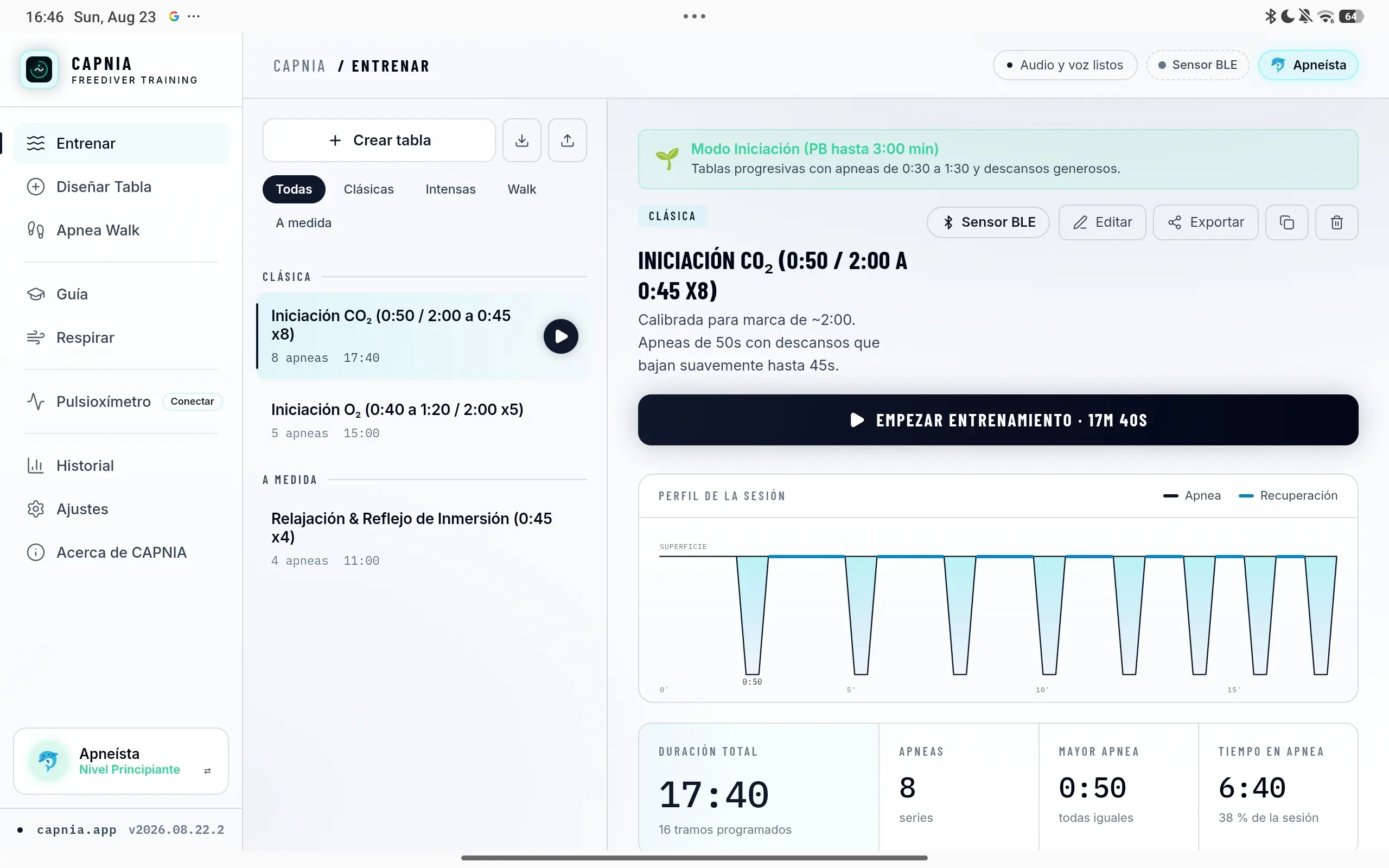
Whichever you pick, the contrasts are tuned so timers and phases read from a distance, which is how the app actually gets used.
Works offline
It is a PWA: once loaded, train in the basement, in the car or at the poolside with no signal.
Absolute Privacy
Your SpO₂, heart rate, and training history remain on your device. No accounts, no cloud servers, no ads.
In your language
Interface and prompts available in Spanish, English and French. Pick the language in settings and the whole app follows, voice cues included.
Installable and on Android
Add it to your tablet or phone home screen and it behaves like a native app. And it is coming to Google Play: CAPNIA works on Android tablets and phones.
Choose how you want to use CAPNIA
Train today directly in your browser on any device or join as a tester for the official Google Play release.
Dry apnea training in your browser
The Web application is fully operational. Train right now on your tablet, computer or phone with no downloads, no signup and complete offline support.
Compatible with Chrome, Edge, Safari and modern browsers.
Help us launch the native app on Google Play
We are recruiting Android testers for the pre-release testing phase. Keep the app installed for 14 days and become a founding tester with VIP perks.
Direct enrollment in the testers list.
Three steps and you are training
Nothing complicated to set up. Open it, train, and it saves itself.
- 01
Pick or design the table
Take one of the presets or build your own in the designer. The preview tells you how long it will run before you start.
- 02
Prop up the tablet and follow along
The app calls every phase out loud and the screen reads from across the room. You focus on breathing; it handles the clock.
- 03
Check your progress
When you finish, the session saves itself and joins your history so you can see how you are moving.
Read this before training
Apnea carries real risks
Holding your breath can cause a blackout with no warning. In water, that is a drowning. No app can watch over you or react for you.
Never in water unsupervised
Not in a pool, not in open water, not in the bath. Always with a qualified buddy watching you.
These tables are for dry training
Do them lying down or seated somewhere safe, never standing, driving or in the water.
Do not hyperventilate
It dulls the urge to breathe without giving you more oxygen, and brings on a blackout with no warning signs.
Talk to a doctor
If you have heart or respiratory problems, high blood pressure, epilepsy, or you are pregnant.
CAPNIA is a training tool, not a replacement for instruction from a qualified coach or for medical advice. You use it at your own risk.
Frequently asked questions
Do I need prior apnea experience?
Not for dry training, but you should understand what you are doing. If you have never done apnea, the sensible move is an in-person course: you will learn the technique and, above all, the safety rules no app can replace. The Guide section covers the fundamentals, but it does not stand in for an instructor.
Why is it built for tablet?
Because dry training happens with the device propped up a couple of metres away, and in that situation the big screen wins outright: timers and phases read from the mat, and the parameters and their result fit together without hopping between screens. That said, it works on Android — tablets and phones — as well as on iPad and on a computer. Tablet is where it shines, but you can train from any of them.
Can I use CAPNIA in the water?
The tables are meant for dry training. You should never practise apnea alone in the water, and an app cannot watch you or pull you out of a blackout. If you train in a pool, always do it with a qualified buddy watching you.
What is Apnea Walk?
Walking while holding your breath, in sets of steps with recovery in between. It trains lactate tolerance and the dive reflex in motion, which is more specific to spearfishing or dynamic diving than a hold lying down. Always on a flat, soft surface, away from stairs, traffic and water.
Do I need to install anything? What about Google Play?
They are two separate things and it helps not to mix them. To train today you install nothing: open CAPNIA in the browser and go, no account needed. If you also want to help us publish it on Google Play, that does mean installing from the Play Store and keeping it for 14 days, which is what Google requires to approve the app. The first is for you; the second is a favour to us, and entirely optional.
Is it free? Will it stay free?
It is free today, with no signup, and it stays that way for the whole beta. Beyond that I have not decided: paid features may appear at some point, but what exists now — tables, Apnea Walk, the guide and the telemetry — will not become paid for people already using it. And anyone who joins as a tester keeps full access regardless.
Which sensors are supported?
Bluetooth Low Energy (BLE) pulse oximeters. Once paired, saturation and heart rate appear on the training screen itself and are recorded with the session. Bluetooth support depends on the browser, so it can vary by device.
Get in touch with CAPNIA
Have questions, suggestions for new training tables, or need help with your BLE pulse oximeter? Reach out to us directly.
We usually respond within 24-48 hours. No spam, no unsolicited marketing.
Technical support & bugs
Help with Bluetooth pulse oximeter pairing, browser compatibility, and local offline storage.
Suggestions & training tables
Propose new training modalities, breathing protocols, or physiological adjustments.
Google Play closed testing
Questions regarding the Android tester program and official release on the Play Store.
🔒 Your contact details are never shared with third parties or used for commercial profiling.
Start your next session
Open CAPNIA on your tablet and get going with the first table. Nothing to install.
Open the app